
Does the NEX Playground help curb screen time in our house?
One of my son’s favorite things to do is go to the local trampoline park for the trampoline video game. He jumps on a trampoline which has a screen and camera pointed at it. It tracks him and puts him inside a video game.
I never minded it because it would wear him out. It also taught him about having to wait in line and make sure you’re taking turns, which not all the kids in the place knew or cared about.
It’s ironic then that I discovered a great deal on the NEX Playground video game system while watching him. I snatched up the deal right before Christmas and figured it would make a great present.
The NEX Playground is a video gaming system with a camera that does the same thing as the trampoline game—it puts the player on the screen and asks them to move around to play.
So, after a few months of use, I wanted to put out my NEX Playground review to help other parents decide if the NEX is right for their families. I’ll answer: Is it easy to set up, does it get your kids moving, and does it help with screen time?
Here’s my NEX Playground review.
What Is The NEX Playground
The NEX Playground is a gaming system that is mostly controlled by your body. The system itself has a camera (which can be covered for your security) which you point at the playing area. Inside games, the system tracks the player, so the kids are moving around playing games.
It gets kids to get up and move around instead of sitting still to play video games.
The selection of games is vast and varied. They have some partnerships that offer popular kids characters inside games. My kids have spent a few hours playing Keepy Uppy from Bluey and gone into Gabby’s Dollhouse.
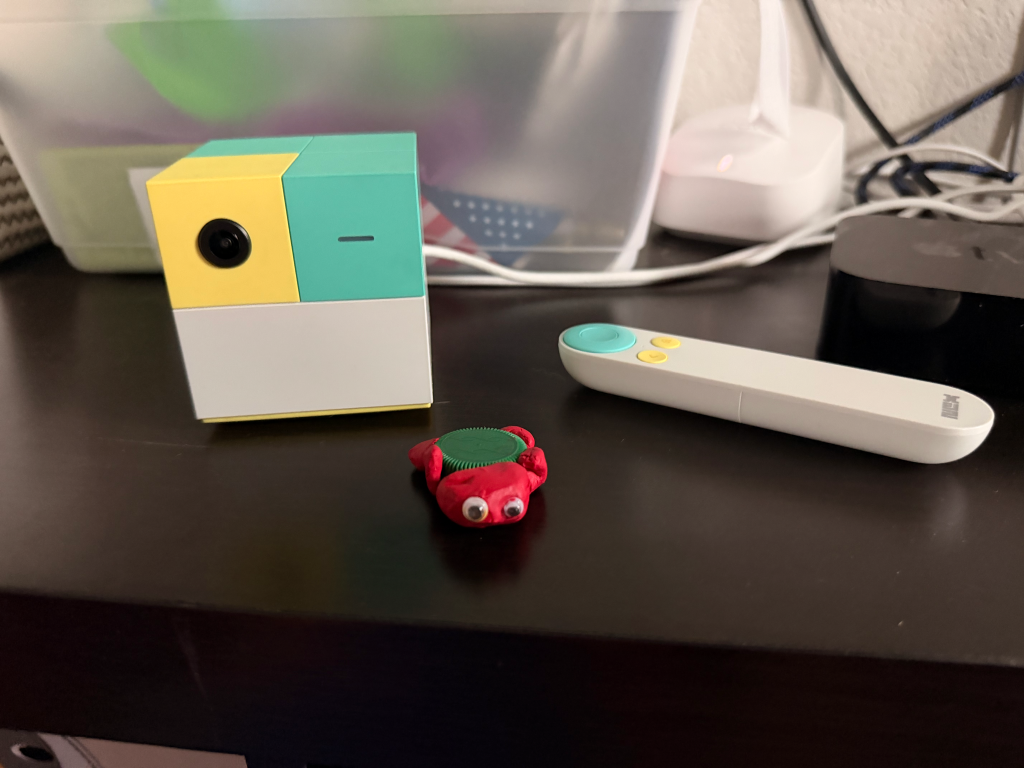
The system does come with a remote to help you set up and select games. It is skinny and beige, with a bright-green button on it, so it does stick out. But we still managed to misplace it a few times.
Unlike regular gaming systems, you don’t purchase individual games for the system. It comes with five games preloaded that you can play whenever, but to access everything, you’ll need a subscription. The system can be pretty expensive, and the added cost of the subscription should be weighed into your decision to bring one into your house. I paid $85 for the year with a sale at Christmas.
While I don’t like the subscription model, I’m glad that my kids don’t have to bug me to purchase games.
Does It Curb Screen Time Desires?
I was hoping the NEX would give my son a way to enjoy screen time without the meltdown that came when it was time to stop.
Before we got the NEX, I had been struggling with my kid and his screen addiction. He always wanted his tablet because those things offer immediate positive responses. But we struggled to get him off it without him having a gigantic meltdown.
He would always ask for his tablet as well. As a father who loves tech, I wanted him to be able to live with his tablet and learn to control his emotions, but I realized that he is too young and unskilled to handle it.
I wanted to get the NEX for him because it would at least get him moving when we wanted screen time. I hoped that if he got up and moved around that it could help him get his screen time, but also get some movement in. Maybe he would also tire himself out and would come to a natural stop.
But it didn’t really go as planned.
Sure, he got up and moved. Every play session, he would move so much that he’d start to sweat. He would get tired. However, when it came time to get off the device, it would be just as difficult to get him off as it would his tablet.
We would give him a timer and warnings. Even after the timer would go off, I would let him finish whatever game he was playing. Yet, nearly every time he would start screaming and pleading with us to let him continue playing. He would lash out at us, trying to verbally hurt us.
Even though he was moving and using his body, he was still getting that spike of dopamine that he struggled to deal with.
Not only that, but he started having issues with losing. If he lost a game to anyone, he would start to have outbursts and refuse to continue playing.
A lot of that is on me as a parent. I’m trying to teach him how to control those emotions and to get him to understand that sometimes when you play a game, you’re going to lose. However, we are in our first steps with him on these things.
It got to the point where we had to limit the use of the NEX just like his tablet. Eventually, he stopped asking for it as much because of those limits. In fact, in the past few weeks, it feels like the NEX has been forgotten. He has asked to play it once, and we had an easier time getting off it, but he hasn’t asked to play much since then.
If you are thinking of getting a NEX Playground to help with screen time with kids, they will get more exercise using it, but it didn’t help cure active screen time issues. We still have meltdowns and anger issues post use.
Does it cure screen time? No, it does not. At least not my kid’s.
Easy Setup and Mostly Go
If you’re not a tech-savvy parent, fret not. The NEX Playground only has a couple of things to plug in, and then you’re good to go.
You’ll need a TV with an HDMI port, which every TV has these days, and a power plug nearby. Plug both of them in, and the system fires up.

You’ll need a place to play because the players will be moving. We have a larger game room, so it hasn’t been a problem, but I’ve also taken it over to my parents, so it’s small enough to travel. Their living room isn’t as large, but it did work to get the kids moving.
Once the system starts up, you’ll have to put in your Wi-Fi credentials to get the system up and running completely. It will do a quick update and if you have a Play Pass (the name for their subscription) you’ll enter your info here, or set it up.
I took our system out of the box to update before Christmas, and it took a while to get it going. If you’re thinking of surprising someone with one of these, I would recommend doing the same so they can hit the ground running.
Once it updates, it will also take some time to download all the games if you have a subscription. But there are a few games you can play without a subscription to get you started.
Small Issues to be Aware of
Tracking Issues
One issue we had while playing our NEX in both places comes from a logistic issue. Most rooms are set up with the TV as the focal point. When playing the game, the kids would be in the middle of the room while the adults would be in the chairs and couches surrounding. If someone sat near the view of the camera, the system could develop lock in issues.
There were many times when the system designated one of us sitting there watching as a player instead of the kid desperately trying to get its attention. We would raise a pillow in front of our face as it tried to lock onto a player. While this would work, it would sometimes forget the person playing and lock back on to an observer.
My son would get frustrated and have a mini-meltdown when this happened, so we found that just moving out of the frame worked the best, but then we had a struggle to watch them play.
One Account to Rule Them All
The NEX does not offer different user accounts. I wish I could set up an account for my kids which allowed me to set age or game restrictions. As it is, there is only one account and every game is listed. The games do have an age range on the select screen, but it would be nice to section off games that might be too mature or difficult for my 5-year-old.
Subscriptions
Paying for another subscription sucks. It’s not too expensive for a year’s worth of games, but I just don’t like subscriptions. It might even be better to offer a tier of subscriptions. Like I don’t need all the games, let me sign up to a toddler package for less money.
That said, I know that the developers require money to continue developing, and I’m not sure how else they could fund the system.
Look, Dad, I’m On TV

The system has a large selection of games, but many of the ones my kids have gravitated to are pretty simple.
I’m genuinely thankful that the NEX puts the target age range on the game page and that my kids actually stick to them.
The games we’ve played usually involve my kids doing simple movements like walking, jumping, or twisting. They don’t have to be athletes to play any of the games, but they will get a good workout in.
My youngest loves the simple games that just mirror the world but with some type of twist. He loves a game that offers tons of filters, like one that makes him look squat and wide.
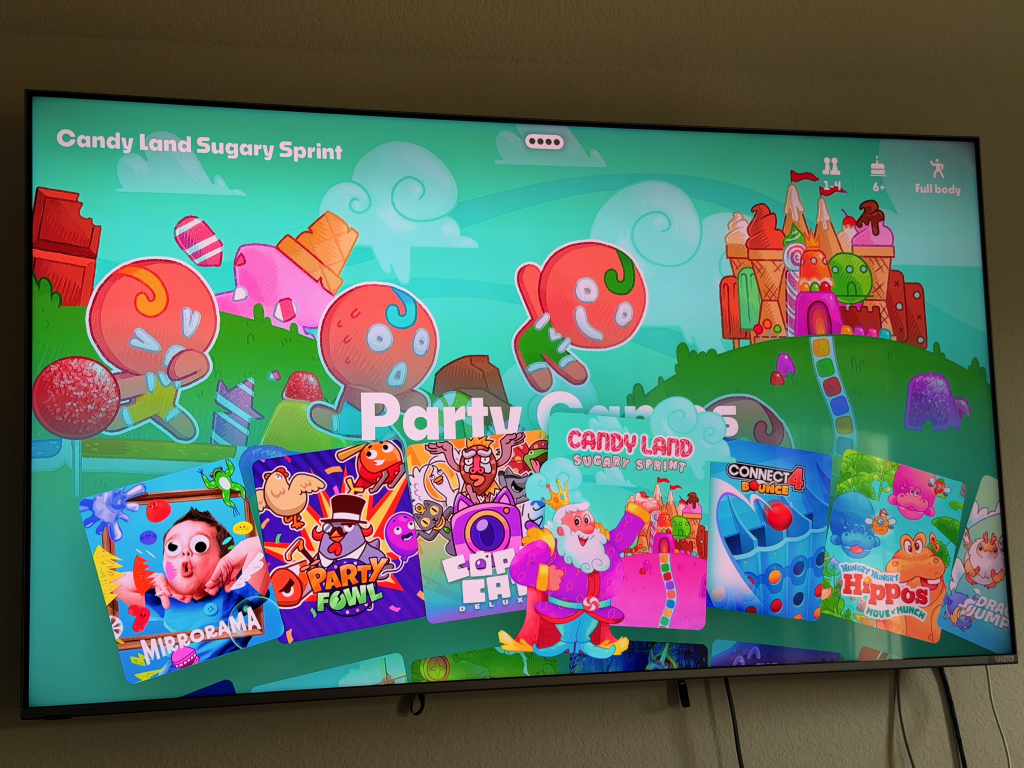
My oldest likes to play all the games for kids 5 and under. He really likes one that has a bow and arrow set up. You have to pretend to pull the string and aim to shoot targets.
The games seem varied and offer numerous good options. Although I worry about the variety as we go. There are only so many ways to play these games, after all. Still, it is very rare that my kids will leave a session of any game here without sweating and needing a drink.
We did struggle with playing some games the right way. There is a bow and arrow game that my son played that he didn’t act like he was shooting a bow and arrow. He jumped around and swung his arms all over the place, and the game interpreted that as him playing. The game did show him what to do with pictures, but maybe a video or animation of someone shooting doing the action would help in some games.
I haven’t played any of the games designed for older kids. They look more mature. I don’t have an older kid to test them, so I’m not sure how to help direct anyone on the issue.
They also offer workout apps, which can help you get fit. Again, I haven’t tried any of these, but not because they look bad. I don’t like workout classes, which is what most of these seem like.
For the most part, I think there is a good mix of all types of games on the system. Plus, new games come to the system frequently enough that things never grow stale.
NEX Playground Review: Should You Get One?
The NEX Playground didn’t solve the screaming issue with my son. If you are looking for a solution to screen time, I’m not sure if this is any better, even if it does get them moving.
That said, besides a few quirks of the system, we have a good time with the NEX Playground, even though we know the shouting could be coming anytime we have to turn it off. My kids have fun playing it, and they get some exercise while doing it. I enjoy watching them have fun seeing themselves on the screen playing games, playing a game with Bluey, and learning some life lessons—even if the lesson comes with crying.
I’m glad we got it at a steep discount, though. It is a pricey device, and it requires a subscription to enjoy most of its games. You’ll have to decide if paying the full price would be worth it to get your kids moving during screen time.
If you have any questions I haven’t answered here, ask me in the comments, and I’ll be happy to try to find an answer.
If you’d like to see more of my tech or parenting thoughts, make sure you check out my hubs for all of my articles, opinions, guides, and more.

Leave a Reply