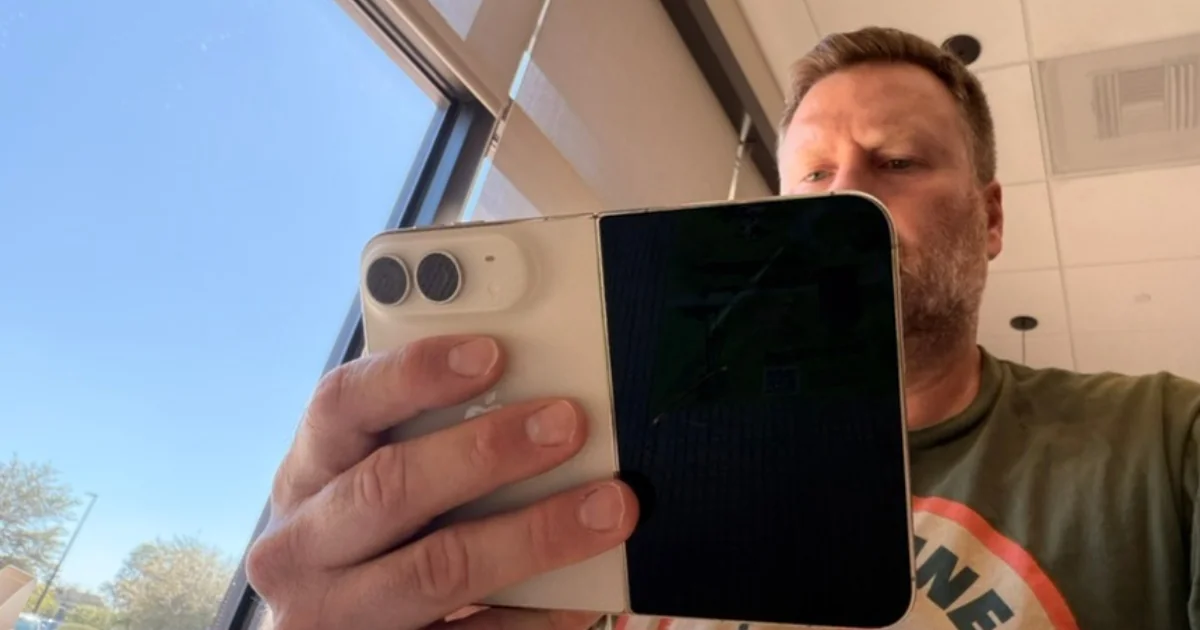
I typed for a moment before I realized that this project called for a larger screen. A few weeks ago, I would have gotten my iPad Pro or MacBook Air from my office to finish. Of course, with my kids around, that action would risk bringing more attention to myself, potentially breaking my space to write.
But in this moment, I didn’t need to do that to get a larger screen. I simply unfolded my iPhone Duo and finished my thought. Then I folded it back and put it away.
I’ve been lucky enough to have gotten a launch day iPhone Duo and have spent over a week trying to not only review it, but also decide if it is a device that could fit into my life. It took me much longer to reach a decision on this iPhone Duo review than any other device I’ve ever had.
So, is this the next big thing? Is it for everyone? Should writers invest their hard-earned money in an iPhone Duo? How is the iPhone Duo for parents?
These are all hard questions to answer. I’m honestly not sure if I could answer them for everyone. But for this iPhone Duo review, I’d like to tell a few stories that might help you decide. Ultimately, determining if this pricey new iPhone fits into your life comes down to one simple question: how long are your daily interactions with your phone?
Picking Up And Looking For The Magic
For the longest time, I scoffed at folding phones. I honestly didn’t see the point of them and they seemed fragile. But that was years ago, and things have changed greatly. They are not as fragile anymore. They are more usable, but I wasn’t sure that I would use them.
Leading up to the iPhone Duo, I didn’t feel that excited even though I always said that I wanted to see Apple’s story with it. Apple’s narrative won me over, although I really only wanted one to try out and see if I liked the form factor. I wasn’t the only one because the Duo blew up on my feeds. My enthusiasm grew as launch day came.
I could see so many ways I would use this now. It didn’t help that I had been using my iPad Pro much less than before, and I felt this could replace two devices at once. But I still had questions about the iPhone Duo.
I lucked out and got a launch day iPhone Duo. With excitement, I made it to the Apple Store early to receive my Duo and spend some time setting it up. While it definitely felt futuristic, it didn’t spark much excitement in me.
With all the hype surrounding the device before launch, and with my mind thinking about how well the wider iPhone experience might be, I expected my world to change. And it didn’t.
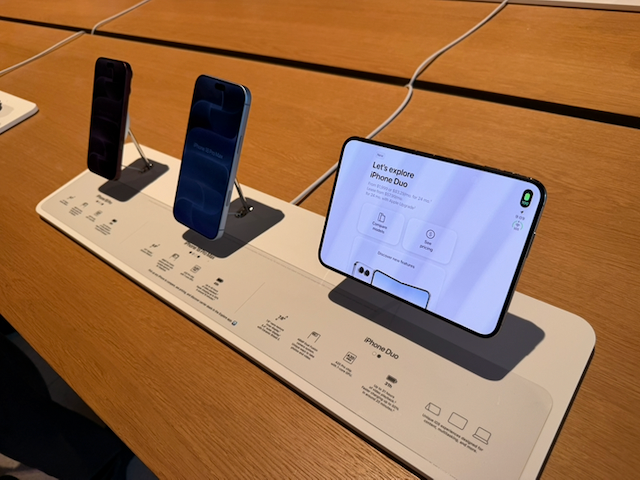
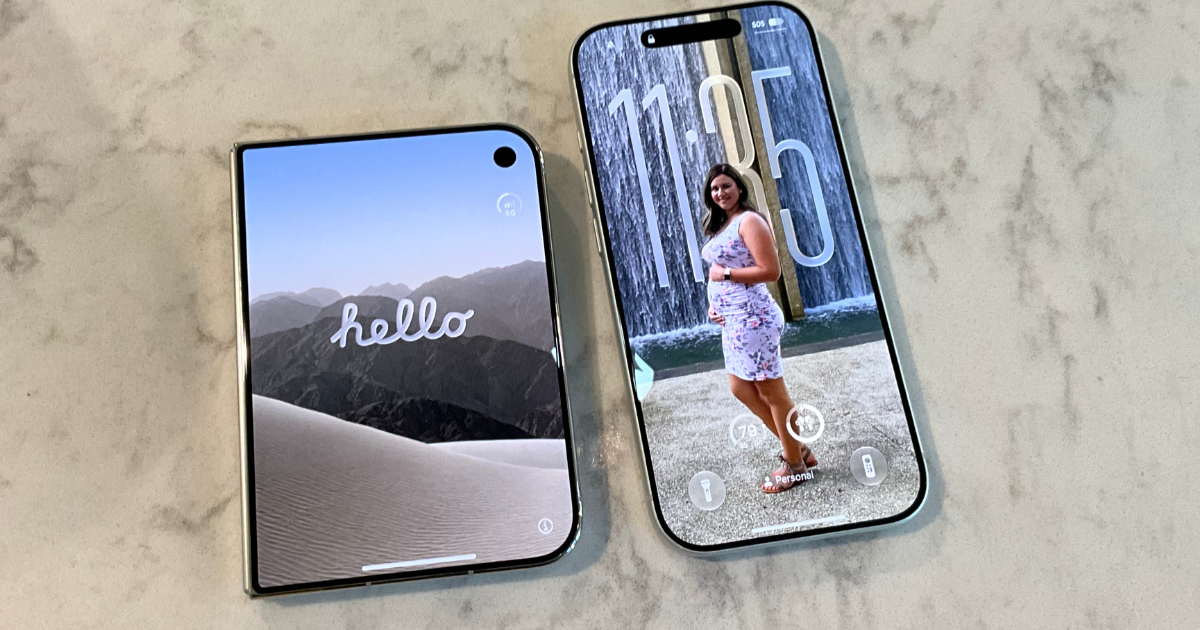
While the unfolded experience offered a large and spacious screen, the folded screen left me a little jaded. The iPhone Duo folded left me with a device that felt awkward and unpleasant to hold. The short screen cut off lots of information that I was used to having.
Folded, the Duo feels heavy and awkward. It is heavier than a Pro Max but much smaller. The device feels dense, and it took me a while to feel comfortable using it one-handed.
The changes Apple made to the interface make sense, but I think it’s still a work in progress. There are times when I want to go backwards, but the back button is now on the right side of the screen.
For a few days, I tried to get used to this phone. I didn’t want to force it, but things like pushing my son on the swing while using my phone felt more difficult.
But I got used to it. After a few days, I tried to go back to my iPhone 17 Pro. That screen felt too narrow to use. I didn’t feel comfortable on it anymore. After a few hours of using the 17 Pro, I wanted to go back to the more spacious screen of the Duo.
And that’s when I found the magic of the device.
I have come to appreciate what Apple has done with the Duo’s folded screen more. Unlike John Gruber, I don’t think it’s the worst iPhone screen ever. I think it just takes some getting used to after decades on a tall and skinny iPhone. Does that screen offer as much real estate? No, but it is still usable.
I find myself using the outer-screen pretty often now. Mostly I’m just using my iPhone in quick bursts with the kids home. Using the iPhone Duo for parenting has taken some adjustments. Now, I can’t swipe-type with one hand on the outer screen. I need to remember to adjust the keyboard to have it move towards the side.
When I have a moment to sit down or if I’m trying to show someone something on my phone, it is too easy to just open the device up and get that spacious screen. It is a joy to sit on the couch and surf through my normal webpages on the unfolded Duo. The screen is large enough to offer an iPad-like browsing experience and small enough to take with me everywhere.
When I’m out in public, I haven’t been prone to unfold the screen. It feels a little weird, especially at first. But I have done it a few times. One night, we went to eat and there was a bit of a wait for our table. My wife took the kids to a nearby store, and I waited there so we wouldn’t be skipped. Like usual, I scrolled Threads, and read the news. I started with my iPhone folded, but after a few minutes, I wondered why, then unfolded the iPhone. Having that larger iPad-like screen became magical.
The front screen is a compromise. It works, and with time, becomes less of an annoyance. The front screen is fine most of the time. But having such a large screen on you when you need it is magical. When you don’t need it, simply fold it up and put it in your pocket.
And it honestly doesn’t feel bad in the pocket either. It feels like it takes up the same amount, or maybe even a little less, space in my pocket that my iPhone 17 Pro did. When I require something the size of an iPad though, it’s right there as well.
The iPhone Duo Review for Writers: Typing and Usability
Before I used the Duo, I felt like the wider screen would be better for typing. Since I often get some writing done on my iPhone, I hadn’t found a comfortable way to do it for long periods. The best I have found was to hold my iPhone horizontally. If I had to do that, maybe the wider aspect ratio of the Duo would be a dream for writing.
In practice, that’s not the case—not fully at least.
When holding the Duo unfolded and in portrait, I’ve had the best experience thumb-typing. But you’ll still have to support your iPhone with your pinky. My hands aren’t cramping while typing like they used to, but now because of my pinky doing more work, it doesn’t feel as comfortable. I’m not sure something like a loop or pop socket would help because I typically hold it with the cameras up top. That would put the grip too high for me to hold and type on.
Folded, it doesn’t feel any different from using a Plus or Pro Max-sized iPhone as far as width goes. It might be a tad wider, but there’s still a lot of space between my hands and the phone. My hands will start to cramp after typing like this for a little while.
But it works.
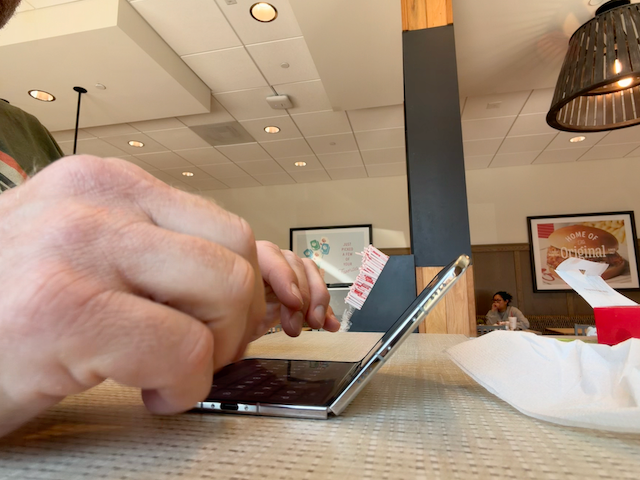
There is also the laptop mode you can use to type. You fold the iPhone Duo halfway closed, and the keyboard should pop up on the bottom screen. I scoffed when I saw it at first and thought that no one would ever use it, but I had to try it. And it worked. It wasn’t perfect. The keyboard is cramped, but it helped me relax my hands for typing. It feels slightly like hunting-and-pecking with the keys since you can’t fit all your fingers on the keyboard, but it does give your thumbs a break.
I wrote and edited all of my first impressions of the iPhone Duo on the iPhone Duo and much of my second impressions on the Duo. I don’t think I’ve ever done everything on an iPhone before. A few months ago, I did with an iPad and an attached keyboard when I went to Peru, but never just an iPhone.
Ulysses has updated, and it works well on all the screens of the iPhone. I’m sure there will be more apps coming. I’ve been a fan of Quilltides lately, and I know that the developer is working on bringing it to the Duo soon.
It is nice that I can turn the iPhone horizontally and open two apps if I need to. While there isn’t much space left on the screen when you invoke the keyboard, I was able to do some editing using a few different apps.
While the iPhone Duo is not an iPad, it can still use a Bluetooth or USB-C keyboard. I think using the iPhone Duo for writing could be a powerhouse. When I’m traveling, I might just tuck my Magic Keyboard into my bag for those moments when I can get some work done if I want to leave my MacBook Air behind.
I even plugged the iPhone Duo into my Apple Studio Display with a keyboard. It worked, but I can only imagine what Apple will or won’t do in that space.
If you are a writer, and you’re curious about how the Duo works, it is a capable writing setup. It doesn’t change the paradigm, but it does allow you to do a few more things than a normal iPhone, like open two apps at once. It can also feel more comfortable to thumb type for an extended period of time.
That said, this is an expensive piece of equipment for simply writing. Buying a MacBook Air would be a better choice if you are just looking for a device to write on. However, if you are tempted by the iPhone Duo to write with, it is a large and great iPhone.
The iPhone Duo for Parents: Daily Usability.
Parenting with the Duo has been more of a challenge. The Duo has been great for writing, but it falls short slightly while parenting.
For me, with my five-soon-to-be-six-year-old and 3.5-year-old, I feel like I am constantly on the go. I don’t have time to flip the Duo open, so I am left with the front screen more often than not.
I’ve already covered how I didn’t like the iPhone Duo as a one-handed device because of the weight and width. It isn’t as easy to use as my iPhone 17 Pro, but I have adjusted. My three-year-old loves to be pushed on the swings and after five minutes of pushing, I usually pull out my phone and try to do some social media or something else. The Duo has made that slightly more awkward.
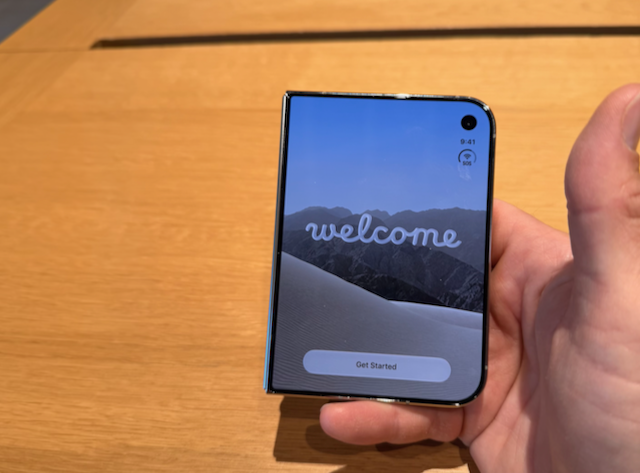
I have found that when I’m pushing the kids on the swings or some other activity, I can use the iPhone Duo one-handed. I used to SwipeType on the 17 Pro, and it wasn’t until I remembered that I could move the keyboard over to one side that things got easier for me. Doing that made it much easier to SwipeType which also made me more confident in holding the device since my thumb wouldn’t be leaving the body of the screen that often.
It has also reduced my use of the iPhone when I’m with my kids. There are times when I want to use the iPhone unfolded, but I know doing that will alert the kids to my business. Instead, I use the phone either less or quicker.
My kids love it, though. I showed my wife how she could see herself on the front screen while I took a picture of her, and my kids have really latched on to that. They also love the Kid Cue feature which puts Snoopy on the screen, but they just like to watch Snoopy.
Using Kid Cue to take pictures helps but doesn’t totally solve the problem. Now the kids are watching the screen instead of looking at the camera. Luckily, my kids love to pose for the camera these days, so it’s not something I have to worry about.
Taking pictures and videos of them has been a unique experience. Most of the photos I’ve taken have come with my iPhone Duo folded. I love the way that the viewfinder takes up the entire screen. It took me a minute to realize that I should turn it horizontally to make it easier to capture and use the camera control button.
I don’t think many people will use the inner camera for more than FaceTime calls, but it works if you need it.
The pictures look great. They are basically on par with the shots I took with my iPhone 17 Pro. They look vivid and capture a lot of detail. However, I do miss having the telephoto lens. Zooming in on the Duo only gets you so far.
The other morning, while I sat on the patio reading, a red looking bird landed on the house next door. I tried to use my camera to get a better look at it, but it didn’t really help much. I could have gotten so much closer with my previous iPhone.
Losing the telephoto lens will be the hardest thing to adjust to as far as the camera goes. I haven’t had to zoom too many times, but I imagine as my kids get into sports more I will miss it.
Honestly though, if you’re a parent who needs access to your phone, I’m not sure that this is the right iPhone for you. There are too many drawbacks and not enough positives. The camera takes good pictures, but you’ll miss the zoom.
Ultimately, while the iPhone Duo for writers is a dream, the iPhone Duo for parents might require a few too many compromises.
My Fall And Stuck Hinge
I’m not a klutz, but I had a night that might say otherwise. At one point, I was on the couch messing around with my Duo unfolded. Our dog made a noise in the other room, so I got up to check on the situation.
As I got up, I tried to close my Duo but also kind of lost my grip on it. I fumbled it around for a second before accidentally knocking it into a nearby wall and then to the ground.
Everything went blurry for a moment. I immediately thought about AppleCare and wondered if they would have replacement stock to fix mine. I closed my eyes because I didn’t want to see the look my wife was now giving me, nor did I want to see the damage.
My eyes narrowed so I could pick up my iPhone Duo. It didn’t feel like there were any dents or broken glass, so I opened my eyes and spun the device around in my hands. It looked like nothing had even happened to it.
Once my heart started beating again, I checked everything and didn’t notice anything out of place. I opened and closed the screen a few times. It was working just like new.
I couldn’t believe it.
This thing took a pretty good beating and it was still going.
You would think that I would have learned my lesson, but alas, something else happened later.
When I let that same dog outside a few hours later, she sprinted after something. She had trapped something up in the rafters of our awning outside. I had a feeling it was a mouse or something, so I took my iPhone Duo out, turned on the camera and attempted to see what had my dog all riled up.
I stepped on this outdoor footstool we have, only, when I pushed up with my foot, the thing tilted. Everything went flying. I landed on the concrete porch, my iPhone Duo sailed away, but it landed in the grass this time. Thankfully, the grass cushioned the fall. Once again, I checked my device out. Since I had it folded, I didn’t think to check the inner screen, but everything looked fine.
Later, I sat on the couch and got my phone out to check social media. When I went to unfold it though, I couldn’t. The hinge wouldn’t go past 45 degrees or so. I didn’t want to force it, so I closed it and tried again. The same thing happened.
For the second time that night, dread flooded my entire body.
I tried one more time to open it, and while it resisted at first, it eventually opened all the way. Then I was worried that the hinge had broken, or it would be loose, or the screen would be damaged, but nothing happened. It opened fine, the hinge felt strong still, and it closed easily.
After waiting a moment, I allowed my breath to return. I tried to open it again. It wouldn’t open again. I closed it and tried to blow in the hinge like an old Nintendo cartridge. I tried again and nothing. Then I attempted to massage the exterior of the hinge and I ran my finger down the spine and tried again. It opened, but this time with a tiny little crack.
I waited for a line to show up on my inner screen or for it to just stop working. My mind flashed to the fall, and wondered if some dirt got in the hinge. I thought about JerryRigEverything’s video where he put sand all over the iPhone Duo.
I never had to book an AppleCare appointment. The crunch happened, but nothing happened to my iPhone Duo. It still works just like it did on the first day. There’s not even a scratch on it. Both falls happened over a week ago, and nothing has changed.
Apple did an impressive job designing a rugged folding iPhone that can take a beating. I’m not looking forward to what happens if I take this thing to the beach. I might need to get a good case with a hinge protector that I only put on during those times. Otherwise, I don’t plan to put a case on it. I would rather not push my luck, but I have been fortunate so far.
I do have an AppleCare plan if something does happen, and I recommend anyone who gets a Duo to invest in AppleCare as well.
The iPhone Duo Poses Helped Win Me Over
I’ve mentioned how I’ve written in laptop mode with this phone, but honestly, the poses are something that helped to win me over.
I didn’t think I would use them much before I got it. StandBy mode hardly got used on my last couple of devices, so I didn’t expect to use them here either.
However, they have quickly become one of my favorite features.
When I go to work at my desk (a rarity these days it feels like), I like to put my iPhone in vertical tent mode. StandBy puts a calendar, clock, and picture on the inner screen. It gives me a little warmth when I look down at it, versus just sitting there.
While I haven’t used tent mode much more than that, I have used laptop mode pretty often for things. I had a FaceTime call with my mom, and it was nice to put my iPhone in laptop mode to talk to her while I continued to cook. It was a hands-free FaceTime call, where I usually have to find a place to prop my iPhone up.
I also like how some of the apps I’ve been using feature these poses. The app Daylish, a visual schedule app, allows you to put the Duo in tent mode and see when your next event is and how long until it starts.
Many reviews have mentioned apps on the Duo. There’s a wide mix of apps that are either optimized for the Duo, iOS 27, or not optimized at all. However, I feel like developers are excited to create for this new device. It will take some time for all apps to be optimized for a device that is backordered for three months.
But I’m excited about the app story for the iPhone Duo. As more developers get the Duo and more people use it, we will figure out what works and what doesn’t.
For every novel idea like Toastie, an iPhone Duo game that uses all the screens, we’ll also get apps that take advantage of the features like Ulysses or games like BlackBox. I can’t wait to see what the best iPhone Duo apps will be like.
One of the reasons I want to keep my iPhone Duo is to experience these apps and the changes they bring to the iPhone.
If you’re an app developer, I’d love to test out what you’re building, so make sure to get in contact.
Little things
Of course, there are other little areas that still feel rough on the new device.
I don’t think the current user experience is perfect, and it could use some more thinking through. That right-hand toolbar, where all the navigation buttons are supposed to move to, can get very crowded. There’s not that much extra real estate.
Moreover, as I mentioned in my last hands-on preview in my newsletter (you should subscribe if you haven’t already), I had to rework my Control Center pages. Since this phone is much shorter than my other iPhone, things didn’t translate correctly. Some of my Control Center buttons got sent to a new page, which threw off other buttons and pages. It wasn’t the end of the world, but I did have to sit down and figure out how I want my Control Center to be on here.
I have also had to figure out how I want my home screens. While I didn’t lose any area for apps and widgets here, I have changed things up to make it flow better. I’m still figuring things out.
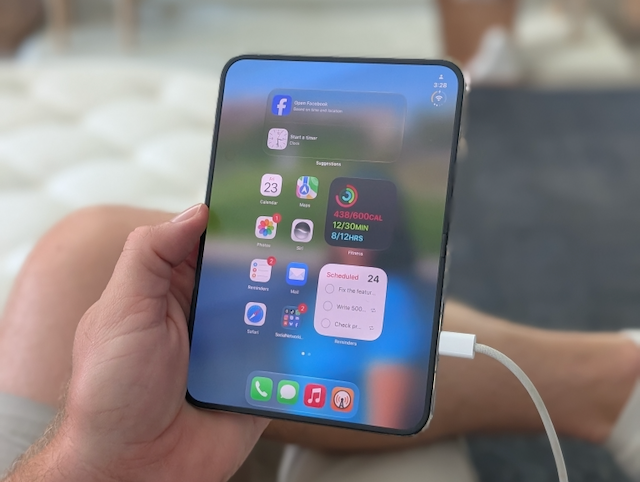
I’m not sure there is a way to fix this, but charging your Duo while you’re using it can be awkward. I tried to use it unfolded and plugged in and the port got in the way. The cable sticks out the side and there’s not much you can do but get a MagSafe charge.
There was also the issue of my 2FA not working right because not all the boxes were on the screen when I tried to autofill it.
The flashlight on the Duo also doesn’t offer you options like the Pro flashlight does, which is odd. On the Pro, I could narrow the beam or spread it wide. On the Duo you can only control the intensity of the light.
I haven’t found a great case yet, although I don’t know if I want one for anything other than to keep the sand out when we go to the beach.
Should You Buy An iPhone Duo?
While I waffled about going back to my iPhone 17 Pro, much of that was my battle with what I needed and what I wanted and those first few days getting used to a new form factor. Since then, I have enjoyed it and even when I tried to go back, I missed the Duo.
I have decided to keep the Duo, even though I hadn’t truly planned on that. I originally thought I would get one to review. But I like it, even if it doesn’t have that telephoto lens.
Since I got my iPhone Duo, I haven’t even used my iPad Pro. I’m thinking of trying to find a good home for it, and if I do, I won’t even have a Face ID device anymore.
I’m also excited to see what Apple does with this device and how developers create for it. It can have a bright and fun future. If Apple continued to work on this device and brings monitor and mouse support, it would be spectacular. But I would never pin a device on the promise or desire for things to come.
This iPhone is expensive, and something to keep in mind.
I don’t think most people should get the iPhone Duo, but it’s not because of what others have said. Touch ID has been fine, and the camera does a great job for most normal people. I’m just not sure many people will like the form factor and the price.
One-handed use is trickier which might make it a dealbreaker for parents, and I think it’s too expensive of a device for most writers.
But if you want one, and can afford it, it’s a fun device.
But also, if you want things like Face ID or a telephoto lens, you might wait until the next iPhone Duo.
If you enjoyed my review, make sure to swing by my iPhone hub, where you can read all my tips, guides, reviews, and more.
And if you need any clarification about the iPhone Duo, make sure to put them in the comments below.
Leave a Reply